#How can I sell domains with ELITEDOMAINS?
 FAQ: This is the help centre of ELITEDOMAINS. We are a domain provider that lets you manage domains simply and smartly. We also run a domain catcher, a domain marketplace and attractive landing pages to sell domains automatically.
Contents
At ELITEDOMAINS you sell domains through your own sale pages: by buy now with escrow service, price negotiation or contact request, on every page also combined. This works for domains in your portfolio and for domains at other providers. Here you find the purchase options at a glance, the steps for internal and external domains, what happens after the sale with AuthCode and payout, and how you also sell via Sedo.
#Video guide
Our video guide on YouTube also shows how to sell your domains with ELITEDOMAINS (in German):
#1) In which ways can you sell domains with ELITEDOMAINS?
There are three ways:
- Internal domains: Domains from your portfolio at ELITEDOMAINS.
- External domains: Domains that are with another provider. You verify them first.
- Sedo MLS: You also offer domains from your portfolio via Sedo, see section 11.
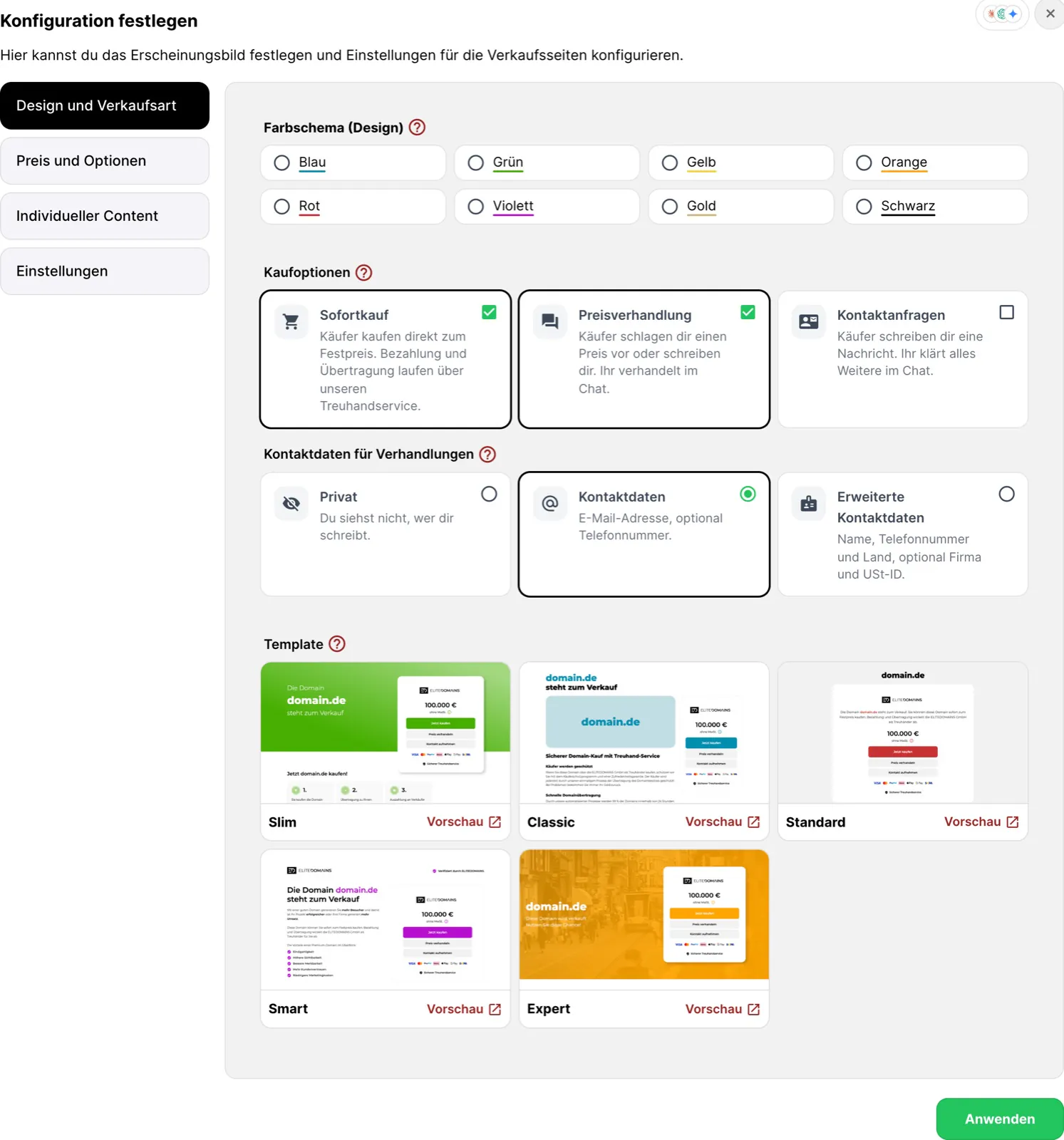
You create a sale page for each domain. With the purchase options you decide how interested parties get the domain: by buy now, price negotiation or contact request, individually or combined. How the page looks is determined by one of five templates.
You show several sale pages together on their own page in a portfolio. With a bundle you sell several domains together for one price. Every verified sale page automatically appears on the marketplace.
#2) Which purchase options are there?
Every sale page shows the purchase options you select, at least one:
| Purchase option | Button on the page | How the sale works |
|---|---|---|
| Buy now | "Buy Now" | The buyer buys at the fixed price; we handle payment and transfer as escrow agent. |
| Price negotiation | "Negotiate the price" | The interested party offers a price or writes to you, and you negotiate in the chat. |
| Contact requests | "Get in touch" | The interested party writes to you with their contact details, and you decide how to proceed. |
New sale pages start with buy now and price negotiation. Every request reaches you under negotiations, where you answer it in the chat.
- 8% commission for sellers, only if the domain is sold through our escrow service: by buy now, an accepted price offer or an offer link. If you complete a sale yourself, no commission applies.
- No additional fees for buyers.
- For sales through the escrow service, we issue the invoice for the buyer according to the VAT rules. If you complete the sale yourself, you issue it yourself.
- Buy now needs a fixed price; without buy now, your price is an asking price. How to find it is described under Setting the price.
#3) What do I have to do to sell domains (step by step)?
Internal domains are verified automatically because we manage them. You only create the sale page.
External domains need three steps:
- Create the sale page.
- Verify the domain within 7 days, via individual name servers or via a TXT entry. Otherwise we deactivate the sale page. If email, a website or other services such as telephony keep running on the domain, or if it is signed with DNSSEC, use the TXT entry in the existing zone. With our name servers the previous entries are dropped, and an old DS record makes the domain unreachable. If you still want to switch, follow the steps under Changing name servers.
- Optional: forward the domain to the sale page. The individual name servers do this automatically; otherwise you set A entries to our server in addition to the TXT entry and replace the previous A, AAAA and CNAME entries for the domain itself and for
www. Otherwise visitors, for example via IPv6, still end up at the previous target. Keep MX and TXT entries, for example for your email. Ifwwwis delegated to other name servers via an NS entry, create the entry forwwwthere. If CAA entries in your zone specify who may issue certificates for the domain, we cannot create an SSL certificate for the sale page. Then promote the sale page via the deep link instead of deleting the CAA entries, because they also protect your other subdomains. If a service that should keep running needs the previous A or AAAA entries of the domain or ofwww, for example a website, your mail server, an SPF entry witha, telephony or a CNAME such asshoppointing towww, don't forward and promote the sale page via its deep link.
How to create the page is shown in Create a sale page; all ways of verifying are explained in Verifying external domains.
#Video guide on verification
Our video guide on YouTube explains how to verify external domains (in German):
#4) Which extensions are available?
You can sell domains with all extensions for which a change of holder and provider with an AuthCode is possible automatically, for example .de, .com, .net, .org, .eu, .info, .at and .ch. If this is not possible for an extension, the purchase is cancelled.
#5) How long is an AuthCode valid and why does it matter?
As long as the AuthCode is valid, the buyer can take over the domain. It is usually valid for 30 days. If an extension has other periods, these apply.
#6) Where do I enter the AuthCode after a sale?
For internal domains we create the AuthCode ourselves; you don't need to do anything. For external domains you receive an email after the sale asking you to enter the AuthCode, which you do on the transfer detail page of the domain. Under our terms you have 10 days for this, and we remind you daily until then.
If there is no AuthCode after 10 days, we reverse the purchase, and all your sale pages are deactivated. The purchase contract with the buyer can still remain in force, because a failed transfer does not automatically cancel it under our terms. So only offer the domain again once the first sale has been settled. You then simply reactivate your other sale pages.
#7) When does the seller get paid?
We pay out the purchase price minus the commission as soon as it has arrived with us and we have taken over the domain with the AuthCode as escrow agent (terms). For internal domains this usually happens within a few minutes of the sale; for external ones, as soon as you have provided the AuthCode and the transfer to us has gone through. We also pay out if the domain cannot yet move to the buyer because of a transfer lock. If you are in arrears with other services from us, we may withhold the payout or offset it against open invoices.
We transfer the money by SEPA to the account you have stored in your settings. It can take a few working days until the money reaches you, because the buyer's payment first goes through the payment provider to our escrow account.
#8) Which payment methods are there?
Buyers pay via our payment provider Stripe with the payment methods available in their country, or in advance by bank transfer. From a purchase price of €10,000, only advance payment is possible. Details are under Buying a domain. For your own orders with us, such as registrations or renewals, the payment methods in the customer account apply.
#9) What happens if the buyer does not take over the domain?
Technically, the buyer can use the AuthCode as long as it is valid, usually 30 days. However, if we ask them for confirmation and they don't reply for five days, the transfer counts as successful under our terms. For .de domains, our terms allow us to put the domain into TRANSIT at the end of the following month if the buyer does not respond for 30 days. If the domain cannot move yet because of a transfer lock, the periods are extended accordingly.
#10) How can I combine sale pages with parking or marketplaces?
- Parking pages: Many have a "Buy domain" link. There you enter your sale page, with the domain as a variable.
- Domain marketplaces: You can list your domains in marketplaces in parallel. If you use their landing pages, however, you sell less through us.
#11) Synchronising internal domains with the Sedo MLS network
If you have an account at Sedo, you can synchronise your portfolio with Sedo. You then manage prices and settings centrally with us and also sell via the Sedo MLS network at many providers. If Sedo sells a domain, the transfer runs automatically. This service is only available for internal domains.
#12) Can I sell domains anonymously?
No. The purchase contract and invoice are in the seller's name, so their name appears on the buyer's documents. It would only be anonymous if we bought the domain ourselves first. However, that causes problems with liability, fraud protection and VAT.
The buyer receives the details needed for the invoice: first name, last name, street, postcode, city, country and tax status (VAT ID, private, business, small business).
#13) Can I also sell for clients?
No. ELITEDOMAINS concludes the contract for sale pages and escrow service with you as the seller; the purchase contract itself is concluded between buyer and seller. The details for the invoice come from the master data of the customer account, not from the holder. Several sellers in one account are technically not possible. If needed, create a separate account for each seller.
- What are backlink domains (expired traffic domains)?
- How do I sell several domains as a bundle?
- What should I know before buying a domain?
- How does buy now with escrow service work?
- How do contact requests on sale pages work?
- How do I create a sale page for my domain?
- How do I verify my domain with a TXT record?
- Which templates are there for sale pages?
- How do negotiations work when selling a domain?
- How does my domain get onto the marketplace?
- What is the Sedo MLS network?
- What are portfolios and how do I create one?
- What price should I set for my domain?
- How do I synchronise domains with Sedo (MLS sync)?
- Which statistics do the sale pages show?
- How is VAT calculated for sellers?
- Bought a domain – what now? How the transfer works
- How do I verify external domains for sale pages?
Last updated on 28/11/2026 at 20:56
Let's go!
Create your account now
Register your next domain with us and compare us with your current provider. The account is free.
Join for free now
