#How do I verify external domains for sale pages?
 FAQ: This is the help centre of ELITEDOMAINS. We are a domain provider that lets you manage domains simply and smartly. We also run a domain catcher, a domain marketplace and attractive landing pages to sell domains automatically.
Contents
You create sale pages for internal and external domains the same way. External domains, which are with another provider, you then verify within 7 days: via individual name servers or via a TXT entry in the existing zone. If you like, you also forward the domain to the sale page. Here you learn which way suits you and how often we check the verification.
#Video guide
Our video guide on YouTube also shows how to verify external domains (in German):
#1) Selecting domains
You select the domains in your domain portfolio or under Verkauf › Verkaufsseiten › Domains hinzufügen (Sale › Sale pages › Add domains). Both ways are shown in Create a sale page.
#2) Making settings for the sale page
You set template, purchase options, price and content under Konfiguration festlegen (set configuration); more under Settings of the sale page.
#3) Checking your order
With two ticks and Erstellen (create) you complete the creation, see Completing the creation. You then verify external domains as described below.
#4) Verifying and forwarding external domains
Our video guide on YouTube shows how to verify external domains (in German): 
At ELITEDOMAINS you can sell external domains from other providers. However, you must verify every external domain so that we know you really are the holder. There are two ways: your individual name servers (section 6) or a TXT entry in the existing zone (section 7). With the individual name servers, visitors are automatically forwarded to the sale page, but the previous entries of the zone are dropped. If email, a website or other services such as telephony keep running on the domain, or if it is signed with DNSSEC, use the TXT entry. If you still want to change the name servers, follow the steps under Changing name servers, otherwise an old DS record makes the domain unreachable.
#5) Why do I need a verification?
For external domains from other providers we need a verification to make sure that you really are the holder and control the domains. This helps us avoid cancellations, fraud and support cases and improves the quality of our data. Internal domains, which ELITEDOMAINS manages, are verified automatically.
#6) Which name servers for verification and forwarding?
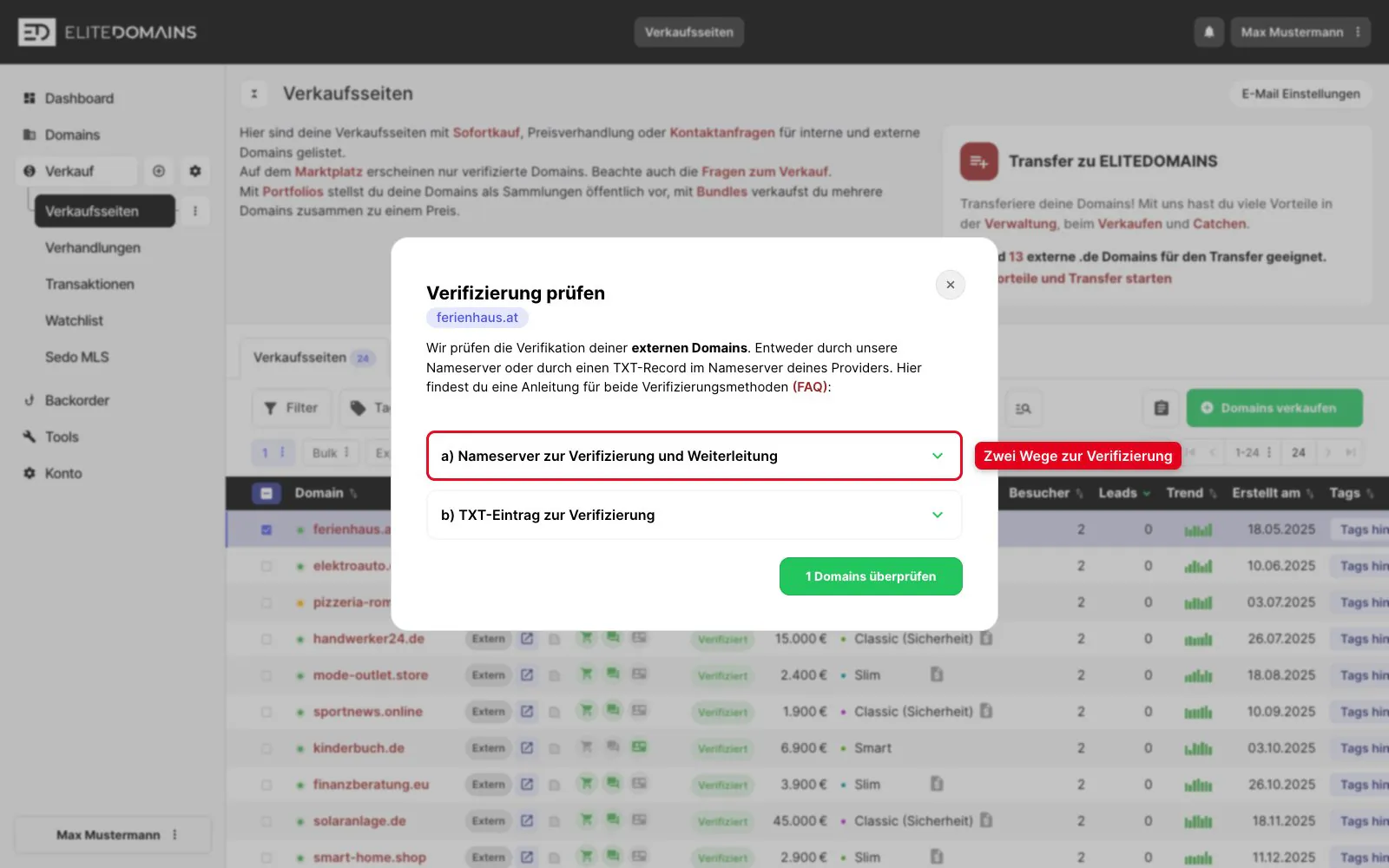
Every user has individual virtual name servers. If you enter these name servers for your domains at your provider, all domains are verified automatically. In addition, all visitors are forwarded to the sale pages of the respective domains. Here you see what our individual name servers look like and where you find them:
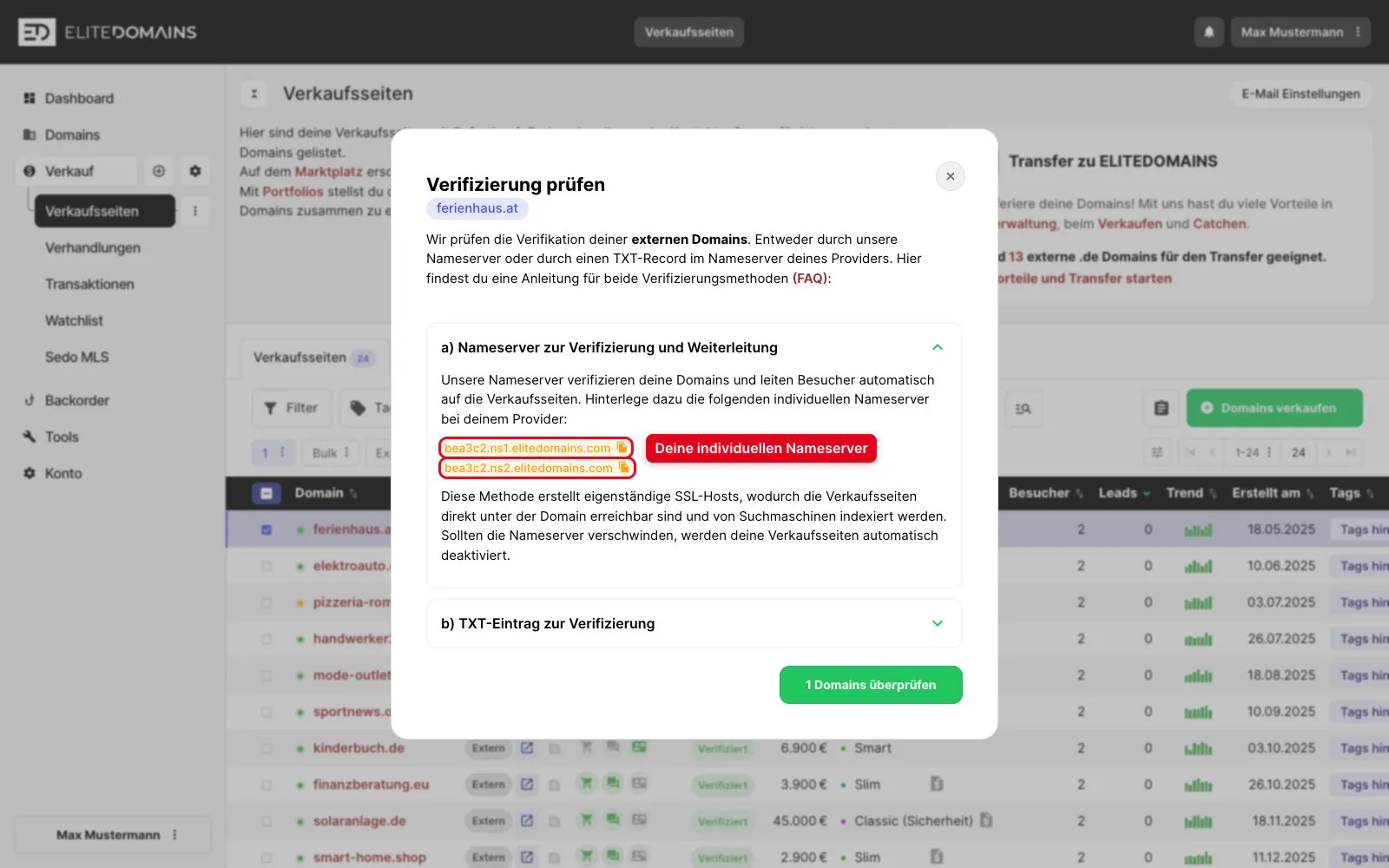
Every user has their own individual name servers. You find your individual name servers for verification under Verkauf › Verkaufsseiten (Sale › Sale pages): select the external domains and choose Bulk › Verifizierung prüfen (check verification). They are also shown directly after creating the sale pages.
After adding the domains, you have 7 days for the verification. If you don't verify in time, we deactivate your sale pages (status „Inaktiv“, inactive).
#7) How can I verify domains via a TXT record?
If the method with the virtual name servers is not possible, for example because you want to route to a parking page, you can instead verify each domain with a TXT record in the name servers already in use. You also find your individual TXT record under Bulk › Verifizierung prüfen or directly after creating the sale pages. The next screenshot shows where you find the TXT entry and what it looks like:
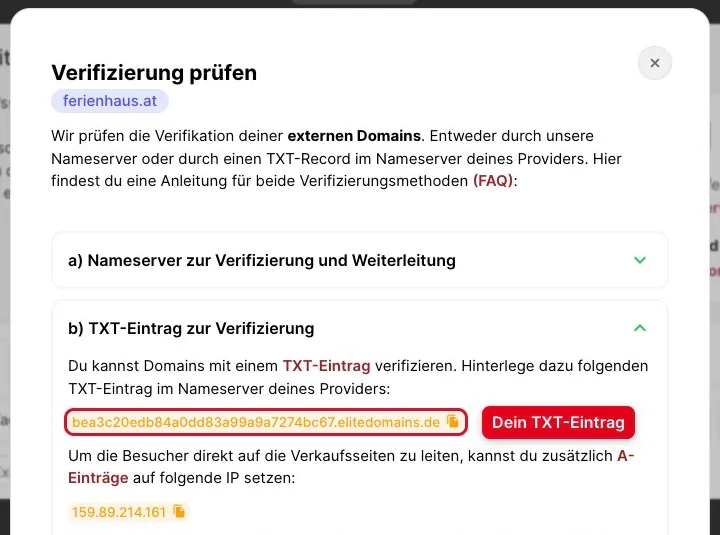
You can leave DNSSEC activated. All that matters is that the DS record matches the name servers in which you create the TXT entry; otherwise we cannot query the domain.
It is very important that you use your individual TXT entry. If you don't know how to create a TXT entry, ask the provider that manages your domains or name servers. See also these guides from popular providers:
- https://www.godaddy.com/help/add-a-txt-record-19232
- https://docs.hetzner.com/dns-console/dns/manage-records/managing-txt-records/
- https://www.ionos.com/digitalguide/hosting/technical-matters/txt-records/
#8) Is there forwarding with A records?
Alternatively, you can point directly to the sale pages with DNS records. For this, use A entries that point directly to our server. Only with this method can you send all visitors to our sale pages reliably and independently of your provider. The forwarding consists of two A entries pointing to our IP and one TXT entry for verification. These name server entries have the following syntax:
A: domain.tld IN A 159.89.214.161
A: www.domain.tld IN A 159.89.214.161
TXT: domain.tld IN TXT 642e92efb79421734881b53e1e1b18b6.elitedomains.de
Replace the previous A, AAAA and CNAME entries for the domain and for www. Keep MX and TXT entries, for example for your email. If www is delegated to other name servers via an NS entry, create the entry for www there. If CAA entries in your zone specify who may issue certificates for the domain, we cannot create an SSL certificate for the sale page. Then promote the sale page via the deep link instead of deleting the CAA entries, because they also protect your other subdomains. If a service that should keep running needs the previous address entries of the domain or of www, don't forward. This applies, for example, to a website that should stay, to an MX or SRV entry pointing to the domain itself or to www, to an SPF entry that allows your mail server via a, to a CNAME such as shop pointing to www, and to domains that receive email directly without an MX entry. Then promote the sale page via its deep link.
#9) How can I forward domains to sale pages?
In general, you can forward to your sale pages from anywhere. You find the deep links of your sale pages in the sales overview and on the sale detail pages. The deep link URL always has this syntax: https://buy.elitedomains.com/your-domain.de
So if you want a deep link (for parking, for example), you must not use our name servers or set an A record, but only verify via TXT.
Here are a few examples of how you can forward to your sale pages:
- Sale link: On parking pages from Parkingcrew or BODIS you link the deep link (via individual sale links with the domain as a variable).
- URL forwarding: You forward your domain at your provider to an existing URL.
- Server: You set up a forwarding via a .htaccess file on your server.
- Website: You set up a forwarding via HTML or JavaScript on your website.
#10) What happens if the verification disappears?
External domains are checked regularly for their verification. If the verification is no longer there (for example because the TXT record was deleted or the name servers were changed), the domain counts as not verified. Domains that are not verified are set to the status „Inaktiv“ after the verification period, and the sale page is deactivated. You can carry out the verification again at any time afterwards.
#11) How often is the verification checked?
After adding your domains, you have 7 days for the verification. After the 7 days, your unverified domains are set to inactive for the time being. You can start verifying your domains again at any time.
#12) When are SSL hosts created?
#Internal domains
Internal domains, i.e. domains in your ELITEDOMAINS portfolio, are verified automatically, and SSL hosts are created automatically. You don't need to do anything.
#External domains
Our name servers: If you verify your domains with our individual name servers, SSL hosts are created automatically. The sale page can then be reached directly under your domain and is indexed by search engines.
TXT and A entry: If you verify your domains with a TXT entry, your sale page can only be reached via the deep link. If you also set an A entry to our IP, SSL hosts are created here too, so your sale page can be reached under your domain and visitors are sent straight to the sale page.
- What are backlink domains (expired traffic domains)?
- How do I sell several domains as a bundle?
- What should I know before buying a domain?
- How does buy now with escrow service work?
- How do contact requests on sale pages work?
- How do I create a sale page for my domain?
- How do I verify my domain with a TXT record?
- How can I sell domains with ELITEDOMAINS?
- Which templates are there for sale pages?
- How do negotiations work when selling a domain?
- How does my domain get onto the marketplace?
- What is the Sedo MLS network?
- What are portfolios and how do I create one?
- What price should I set for my domain?
- How do I synchronise domains with Sedo (MLS sync)?
- Which statistics do the sale pages show?
- How is VAT calculated for sellers?
- Bought a domain – what now? How the transfer works
Last updated on 28/11/2026 at 20:39
Let's go!
Create your account now
Register your next domain with us and compare us with your current provider. The account is free.
Join for free now
