#How do negotiations work when selling a domain?
 FAQ: This is the help centre of ELITEDOMAINS. We are a domain provider that lets you manage domains simply and smartly. We also run a domain catcher, a domain marketplace and attractive landing pages to sell domains automatically.
Contents
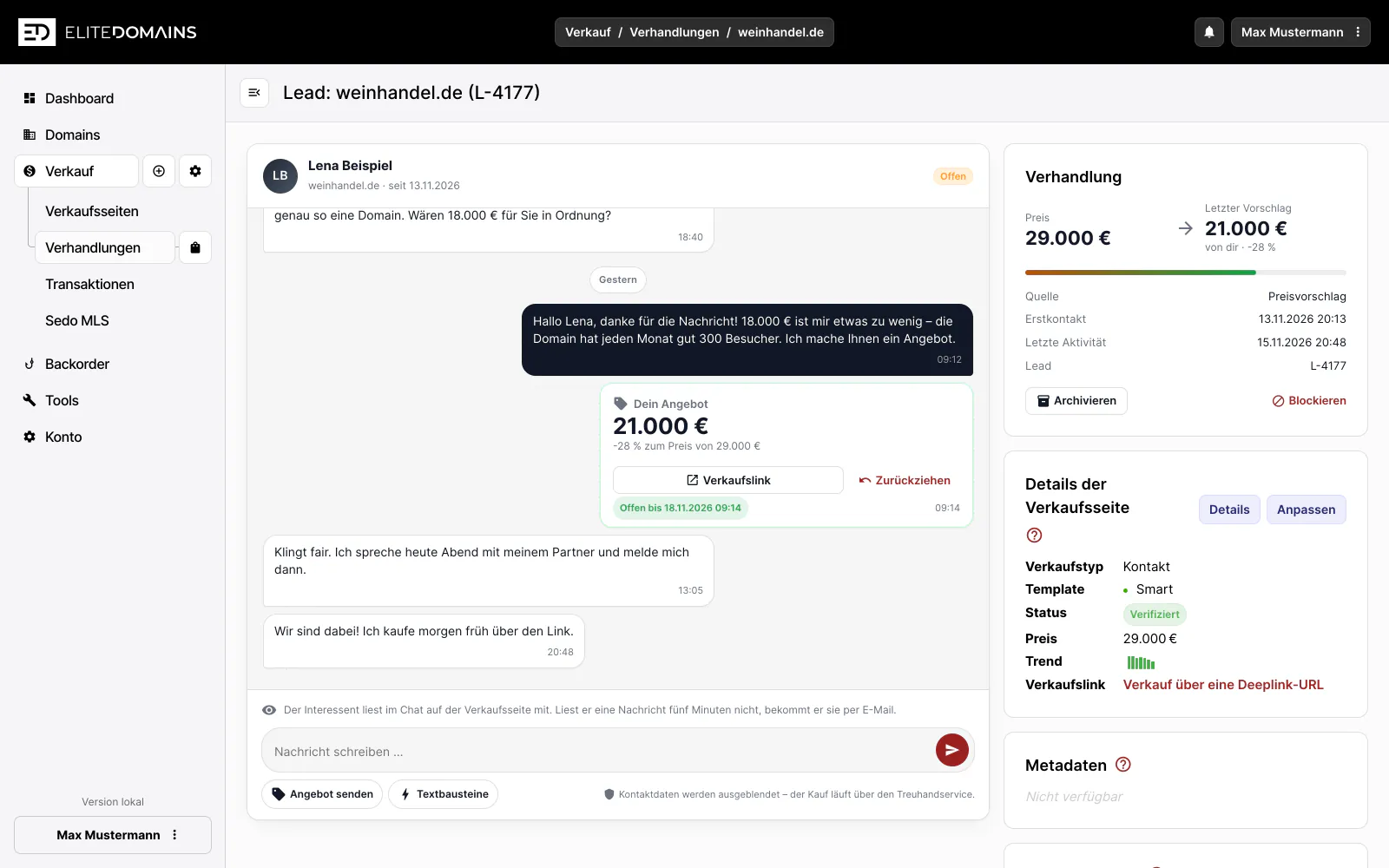
With the purchase option price negotiation, interested parties offer you a price on your sale page or write to you. Under „Verkauf“ → „Verhandlungen“ (Sale → Negotiations) you collect these price offers together with contact requests and abandoned purchases, each as a chat in which you reply and make offers. With offer links you sell a domain at your price through our escrow service at any time, even without a prior request.
#1) How do requests appear in the negotiations?
A request appears as soon as an interested party becomes active on one of your sale pages. The column „Leads“ in the list of your sale pages counts these requests too:
- Price offer or message: via "Negotiate the price" on sale pages with the purchase option price negotiation.
- Contact request: via "Get in touch" on sale pages with the purchase option contact requests.
- Abandoned purchase: when a buy now was started but not completed. It appears six hours after it was abandoned.
#2) How does the negotiation chat work?
Every negotiation opens as a chat: messages, the interested party's price offers and your offers are in one thread. The interested party confirms their first request via a link in an email. After that they reply directly on the sale page and don't need an account. For recurring replies you create text snippets. You can block an interested party who is a nuisance.
#3) Which contact details do I see of the interested party?
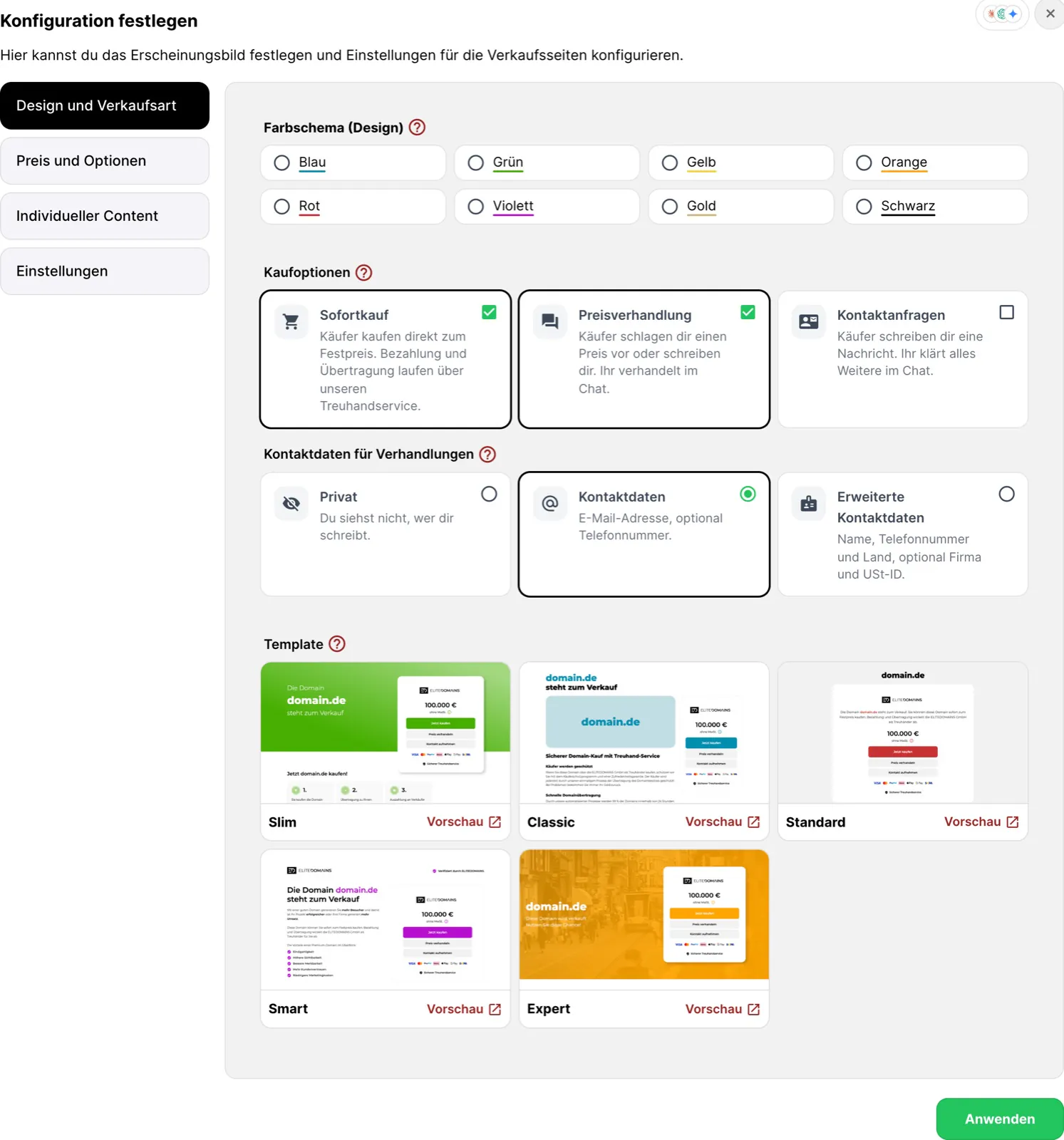
You set this in the settings of the sale page under „Design und Verkaufsart“ → „Kontaktdaten für Verhandlungen“ (design and sale type → contact details for negotiations). The interested party releases the details before their first request:
- Privat (private): you don't see who is writing to you.
- Kontaktdaten (contact details, default): email address, optionally phone number.
- Erweiterte Kontaktdaten (extended contact details): name, phone number and country, optionally company and VAT ID.
With a contact request you always see the interested party's full contact details. If you later ask for more contact details, this also applies to ongoing negotiations: the interested party is asked again, and you only see the additional details once they release them.
#4) How do I answer a price offer?
You accept a price offer or reply with a counteroffer. The interested party then receives an email with an individual sale link:
- They can buy the domain at this price for 72 hours, and we remind them during this time.
- A purchase is only concluded once they complete the checkout.
- You can withdraw an open offer at any time.
- Price offers are at least €99 and below the price of the sale page.
You can also allow price offers for a bundle. They then apply to all domains of the bundle together.
You choose price negotiation in the settings of your sale page under „Design und Verkaufsart“ → „Kaufoptionen“ (purchase options), for many domains via „Verkauf“ → „Verkaufsseiten“ → „Bulk“ → „Verkaufsseiten bearbeiten“ (edit sale pages). New sale pages start with buy now and price negotiation. An accepted price offer runs through our escrow service, and the sales commission applies.
#5) What are offer links?
An offer link is a link with your price for a sale page. Whoever opens it buys the domain directly at this price, even on a page without buy now or without price negotiation. You create the link on the detail page of the sale page under „Angebotslinks“ (offer links) and send it yourself, for example by email or in a network.
You choose a validity between three and 90 days and see how often the link was opened. If you withdraw it or the domain is sold, it no longer works.
#6) When do I get an email?
If an interested party writes to you and you don't read the message for five minutes, you get all new messages bundled in one email. The interested party receives your messages the same way. In addition, the bell in the app shows new messages, and the menu item „Verhandlungen“ shows how many negotiations are unread. You switch off the email in the settings under „Benachrichtigungen“ → „Marktplatz“ (notifications → marketplace).
#7) What do I see under „Als Käufer“?
If you yourself offer a price on someone else's sale page or write to the seller, using the email address of your ELITEDOMAINS account, the negotiation appears under „Verhandlungen“ → „Als Käufer“ (as buyer). There you reply in the same chat, offer a price or buy directly at the price offered.
#8) Can I manage negotiations via the API?
Yes. Via the API and the MCP server you read and write messages, answer price offers, withdraw offers, archive negotiations and manage offer links.
- What are backlink domains (expired traffic domains)?
- How do I sell several domains as a bundle?
- What should I know before buying a domain?
- How does buy now with escrow service work?
- How do contact requests on sale pages work?
- How do I create a sale page for my domain?
- How do I verify my domain with a TXT record?
- How can I sell domains with ELITEDOMAINS?
- Which templates are there for sale pages?
- How does my domain get onto the marketplace?
- What is the Sedo MLS network?
- What are portfolios and how do I create one?
- What price should I set for my domain?
- How do I synchronise domains with Sedo (MLS sync)?
- Which statistics do the sale pages show?
- How is VAT calculated for sellers?
- Bought a domain – what now? How the transfer works
- How do I verify external domains for sale pages?
Last updated on 28/11/2026 at 20:59
Let's go!
Create your account now
Register your next domain with us and compare us with your current provider. The account is free.
Join for free now
