#How do I synchronise domains with Sedo (MLS sync)?
 FAQ: This is the help centre of ELITEDOMAINS. We are a domain provider that lets you manage domains simply and smartly. We also run a domain catcher, a domain marketplace and attractive landing pages to sell domains automatically.
Contents
With the Sedo MLS sync you connect your Sedo account to ELITEDOMAINS. You then list domains in the Sedo MLS network directly with us, maintain prices and type of sale and see the MLS status of each domain. For this you store your Sedo registrar listing ID once, compare your portfolio and add further domains in bulk.
#Video guide
Our video guide on YouTube shows how to synchronise your domains with Sedo (in German):
#1) What does the Sedo MLS sync give me?
Via the MLS sync we manage your domains at Sedo for you:
- Ownership verified automatically: Sedo confirms domains that are with us without further proof.
- Sedo MLS activated: With a fixed price and buy now, the domain appears at the providers in the MLS network and is transferred automatically in the event of a sale (fast transfer).
- Everything in one place: You maintain price and type of sale for Sedo at ELITEDOMAINS, also for many domains at once.
What the MLS network is and what happens on a sale is described under What is the Sedo MLS network?.
#2) Step 1: Where do I find the registrar listing ID at Sedo?
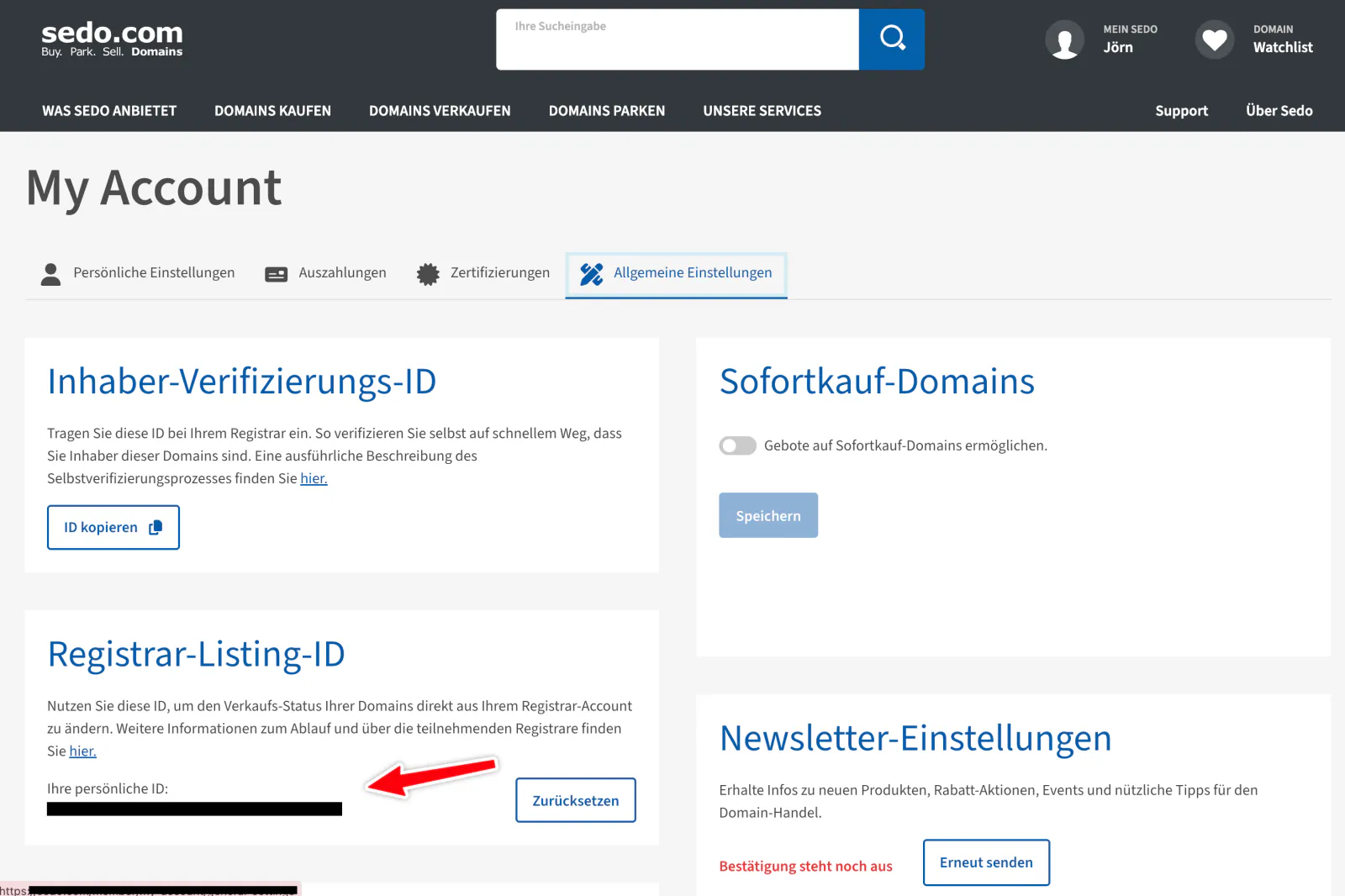
With the registrar listing ID you allow us as the provider to add and change domains in your Sedo account. You find it at Sedo under My Sedo > My customer details > General settings.
#3) Step 2: Where do I enter the listing ID at ELITEDOMAINS?
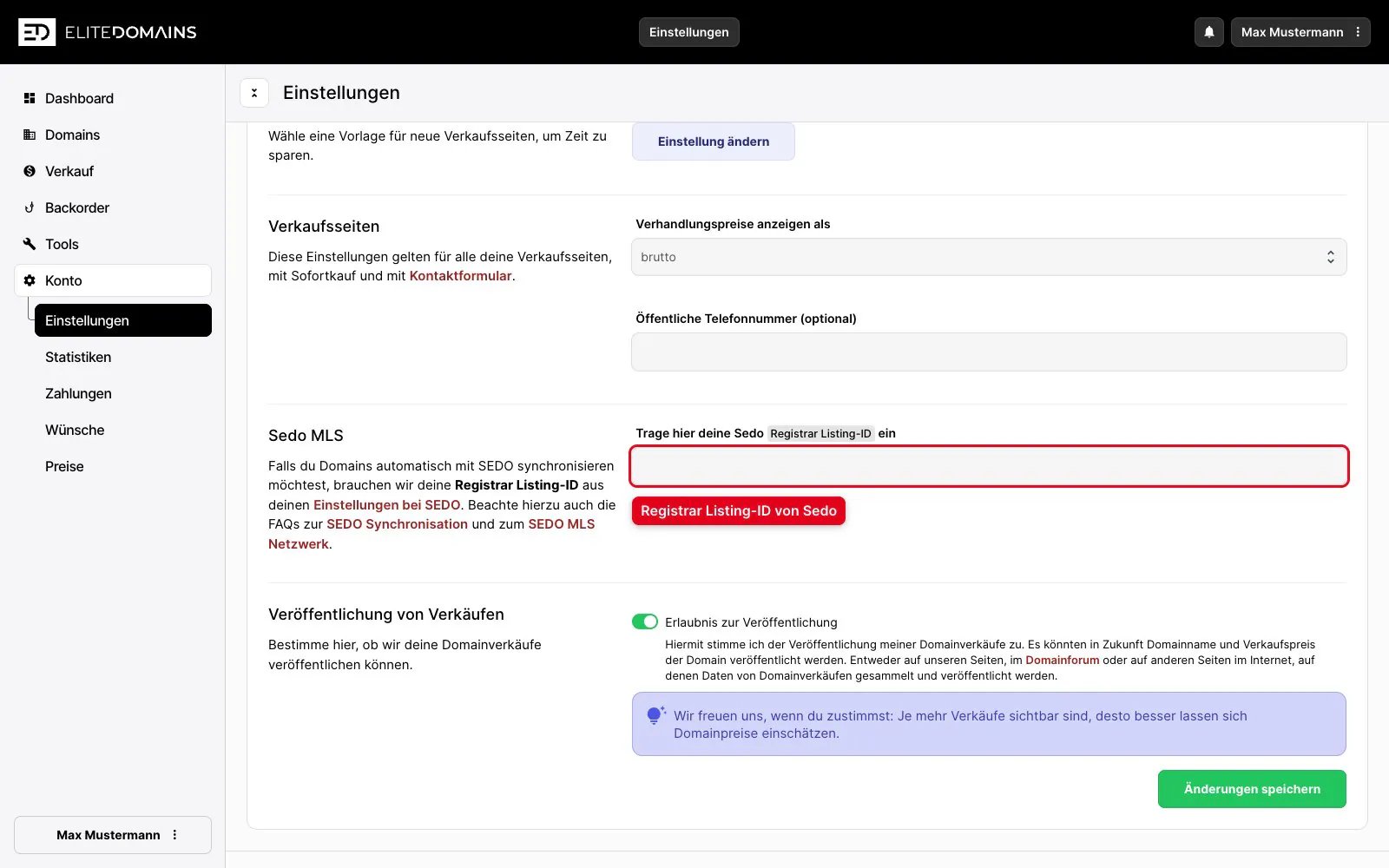
Enter the registrar listing ID under „Einstellungen“ > „Verkauf“ (Settings > Sale) under „Sedo MLS“ and save. Your Sedo account is now connected to ELITEDOMAINS.
#4) Step 3: How do I compare my Sedo portfolio?
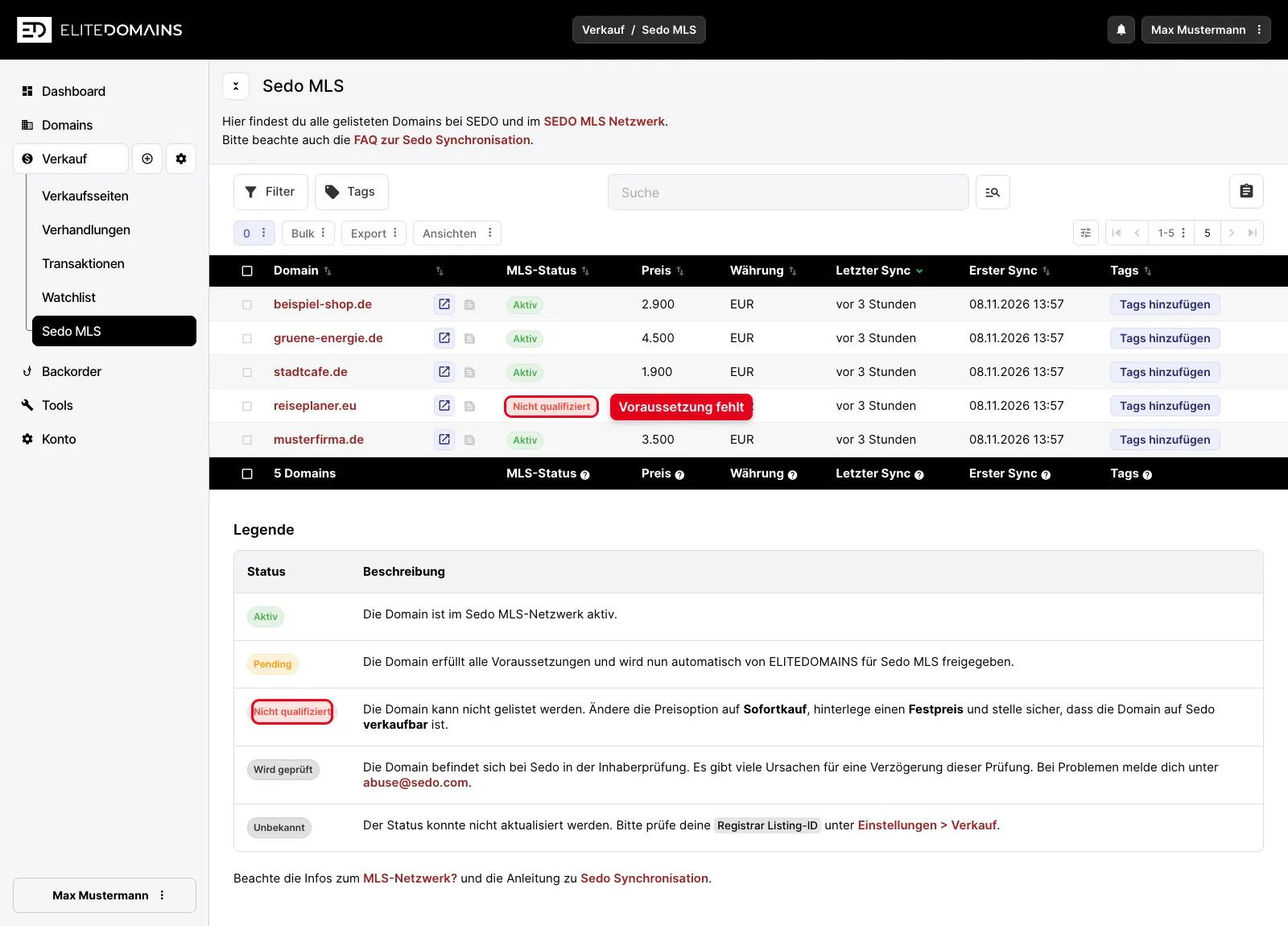
Open „Verkauf“ → „Sedo MLS“ (Sale → Sedo MLS) and click „Daten von SEDO auslesen“ (read data from Sedo). We then read all domains and settings from your Sedo account and take over the domains that are at ELITEDOMAINS. With many domains the first comparison takes a while.
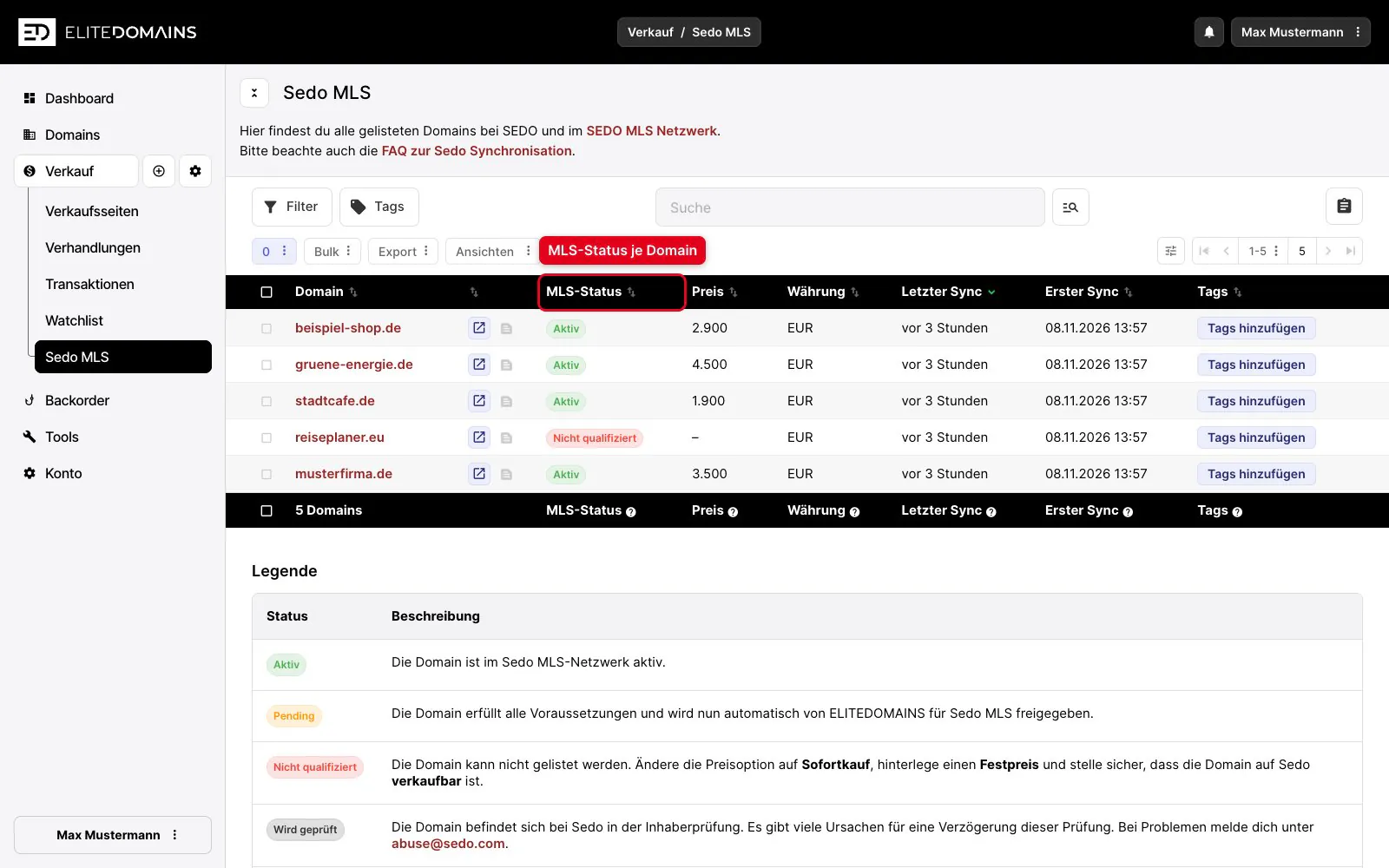
In the table you sort by „Letzter Sync“ (last sync) or „Erster Sync“ (first sync) and see the MLS status, price and currency at Sedo for each domain.
#5) Step 4: Which domains do I need to check after the comparison?
After the comparison, check above all domains with the status „Nicht qualifiziert“ (not qualified). They cannot enter the MLS network as long as a requirement is missing. Select the domains and correct this via „Bulk“ → „Bei Sedo eintragen“ (list at Sedo), also for many at once:
- „Sofortkauf“ (buy now) is chosen as the type of sale.
- A fixed price is set.
- The domain can be sold at Sedo, i.e. it is not locked, for example.
#6) Step 5: How do I list new domains at Sedo?
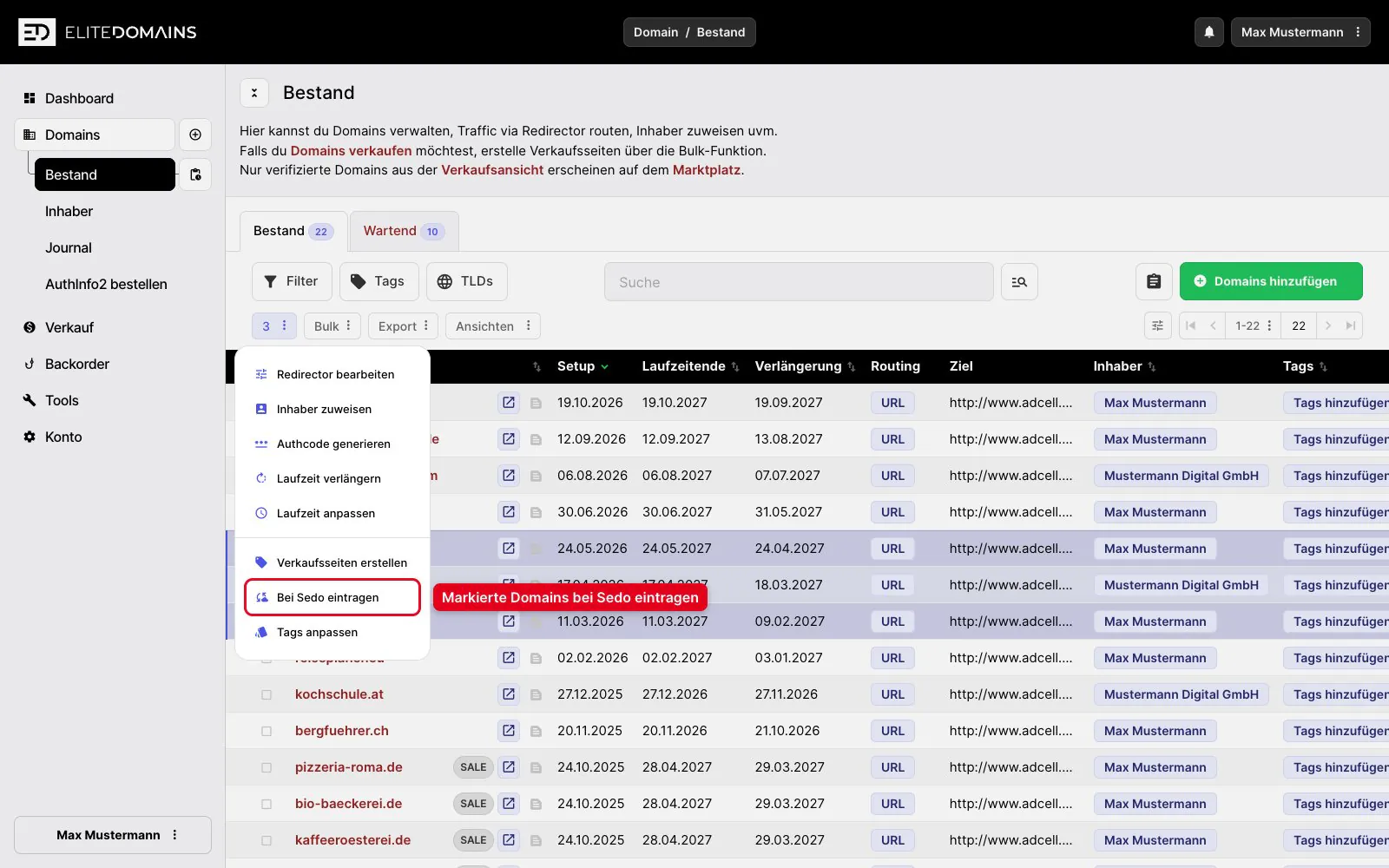
In your domain portfolio, the filter „Kein MLS“ (no MLS) shows all domains that are not yet at Sedo. Select them and choose „Bulk“ → „Bei Sedo eintragen“. The same works under „Verkauf“ → „Verkaufsseiten“ and on the detail page of a sale page in the section „Sedo-MLS“.
In the dialog you set the price and the type of sale; for the MLS network, „Sofortkauf“. We list the domains at Sedo, verify ownership and make the necessary settings. They then appear under „Verkauf“ → „Sedo MLS“.
#7) What do I do if a domain is not activated?
- Status stays on „Wird geprüft“ (being checked) for a long time: Usually the problem is at Sedo, for example a lock on the domain. Delete the domain under „Verkauf“ → „Sedo MLS“ and add it again via your domain portfolio. If that doesn't help, write to [email protected].
- Old entries at Sedo: If you no longer want to offer a domain via Sedo, also take it off sale there. If you move a domain from the MLS sync to another provider, we also delete it at Sedo. If you want to keep selling it there, check your Sedo account after the move and list it again if necessary.
- Changes directly at Sedo: You can still make changes yourself in Sedo's domain management; we take them over at the next comparison. If you maintain both places, you easily lose track.
- Starting over: If you have deleted everything at Sedo, you list your portfolio again as in step 5.
#8) Which errors occur when deleting from Sedo?
If you delete domains under „Verkauf“ → „Sedo MLS“, we also delete them at Sedo. This doesn't work as long as one of these actions is running at Sedo. The app shows you the reason; then wait or end the action at Sedo:
- The domain has an active bid.
- The domain is being transferred.
- The domain is in an auction.
- The domain is in the ownership check.
#9) Which errors occur when listing at Sedo?
When listing, the app shows you the reason if Sedo rejects a domain. Correct the error or sell the domain via a sale page. Typical reasons:
- The domain violates Sedo's terms (clarify via [email protected]).
- The domain is locked.
- The price or minimum price is too low or has a wrong format.
#10) What does the MLS status mean?
Under „Verkauf“ → „Sedo MLS“ each domain has one of these statuses:
- „Aktiv“ (active): The domain is active in the Sedo MLS network.
- „Pending“: The domain meets all requirements; we are now releasing it for Sedo MLS.
- „Nicht qualifiziert“ (not qualified): The domain cannot be listed. Choose buy now, set a fixed price and make sure the domain can be sold at Sedo.
- „Wird geprüft“ (being checked): Sedo is checking ownership. This can take time for many reasons; if there are problems, [email protected] helps.
- „Unbekannt“ (unknown): We could not retrieve the status. Check your registrar listing ID under „Einstellungen“ > „Verkauf“.
- What are backlink domains (expired traffic domains)?
- How do I sell several domains as a bundle?
- What should I know before buying a domain?
- How does buy now with escrow service work?
- How do contact requests on sale pages work?
- How do I create a sale page for my domain?
- How do I verify my domain with a TXT record?
- How can I sell domains with ELITEDOMAINS?
- Which templates are there for sale pages?
- How do negotiations work when selling a domain?
- How does my domain get onto the marketplace?
- What is the Sedo MLS network?
- What are portfolios and how do I create one?
- What price should I set for my domain?
- Which statistics do the sale pages show?
- How is VAT calculated for sellers?
- Bought a domain – what now? How the transfer works
- How do I verify external domains for sale pages?
Last updated on 28/11/2026 at 20:06
Let's go!
Create your account now
Register your next domain with us and compare us with your current provider. The account is free.
Join for free now
