#What is the AuthCode (AuthInfo) for a domain transfer?
 FAQ: This is the help centre of ELITEDOMAINS. We are a domain provider that lets you manage domains simply and smartly. We also run a domain catcher, a domain marketplace and attractive landing pages to sell domains automatically.
Contents
The AuthCode is a kind of password for transferring a domain to another provider. It is also called AuthInfo, auth code, authorisation code or EPP code. You get it from your current provider, at ELITEDOMAINS on the detail page of the domain or via API, and enter it at the new provider when ordering. For .de domains it is valid for 30 days; if the old provider doesn't send one, DENIC's AuthInfo2 code helps.
#1) What do I need an AuthCode for?
With the AuthCode you prove that you are authorised for the domain transfer. Only someone who knows the code can move the domain to another provider. This way the code prevents a stranger from taking over your domain. Without an AuthCode, no change of provider starts.
Every provider must give the domain holder the AuthCode. Treat it like a password and only enter it at the new provider.
#2) How do I get the AuthCode at ELITEDOMAINS?
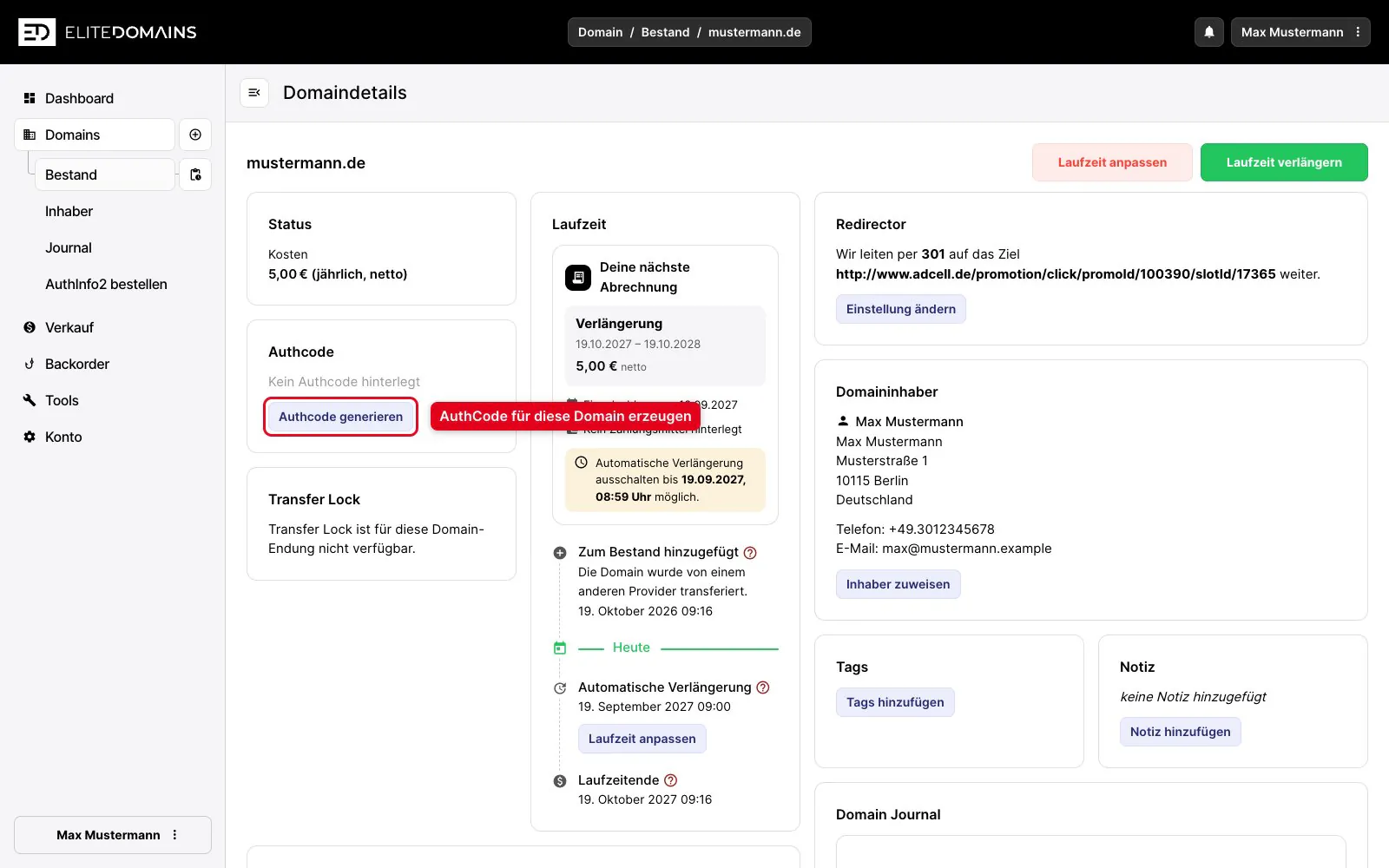
You create the AuthCode on the detail page of the domain (the account is in German):
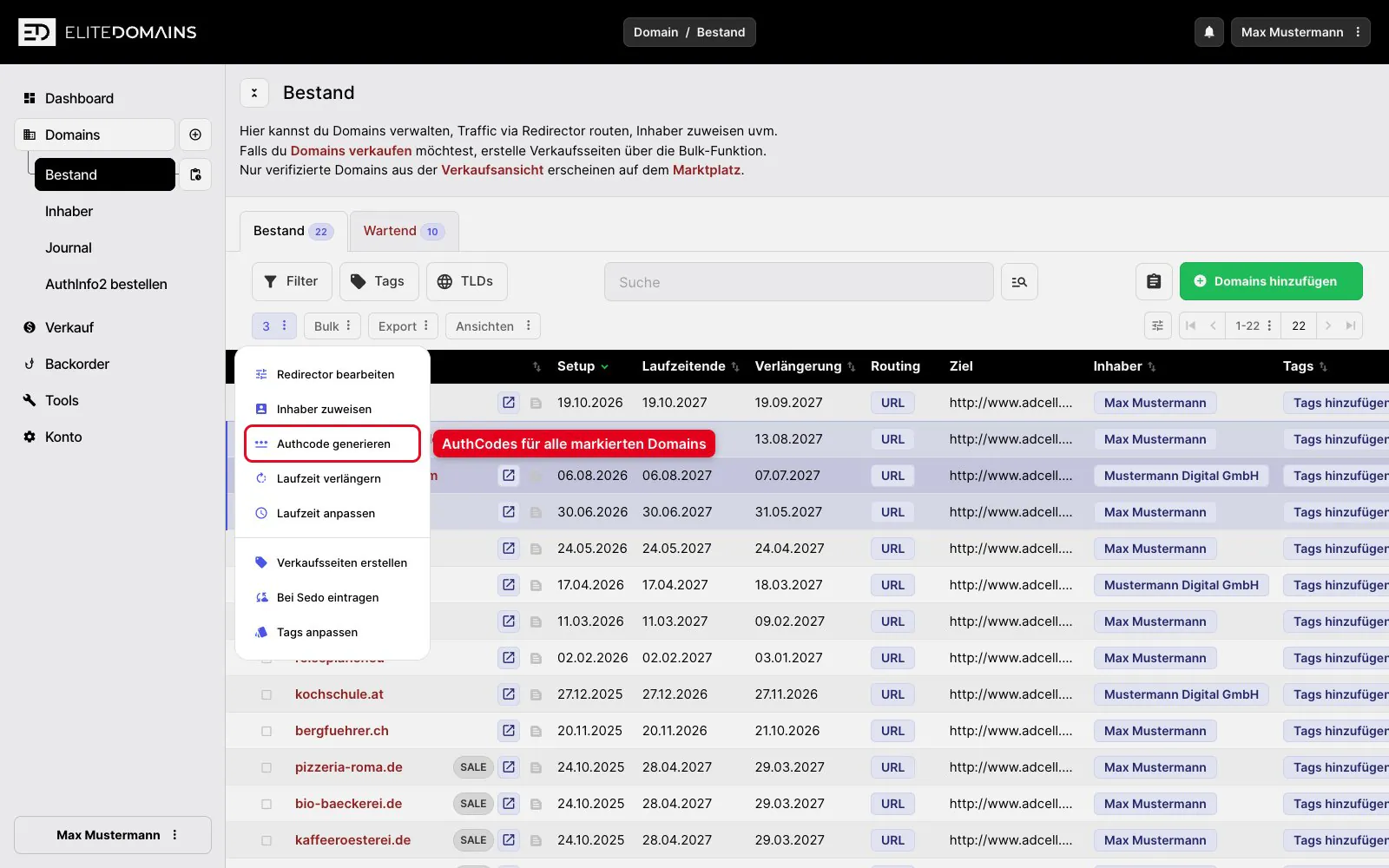
For several domains, you create the codes with a bulk action in your domain portfolio:
For some extensions such as .eu, the registry creates the code itself, and we then read it out for you. If the detail page shows a lock under „Transfer Lock“, remove it before the move.
#3) Can I retrieve the AuthCode via API?
Yes. Via the API you retrieve the AuthCode of a domain and, for .de domains, order an AuthInfo2 code. Via the MCP server, an AI assistant such as Claude can do this for you too. This way you get the codes for many domains without clicking each one.
#4) Where do I get the AuthCode at another provider?
At your current provider you usually find the AuthCode in the domain management. At IONOS it is called „Autorisierungscode“; at Strato you only get it after cancelling with a change of provider. The ways at IONOS (1&1), Strato and all-inkl are described in the guide Moving a domain from IONOS, Strato or all-inkl.
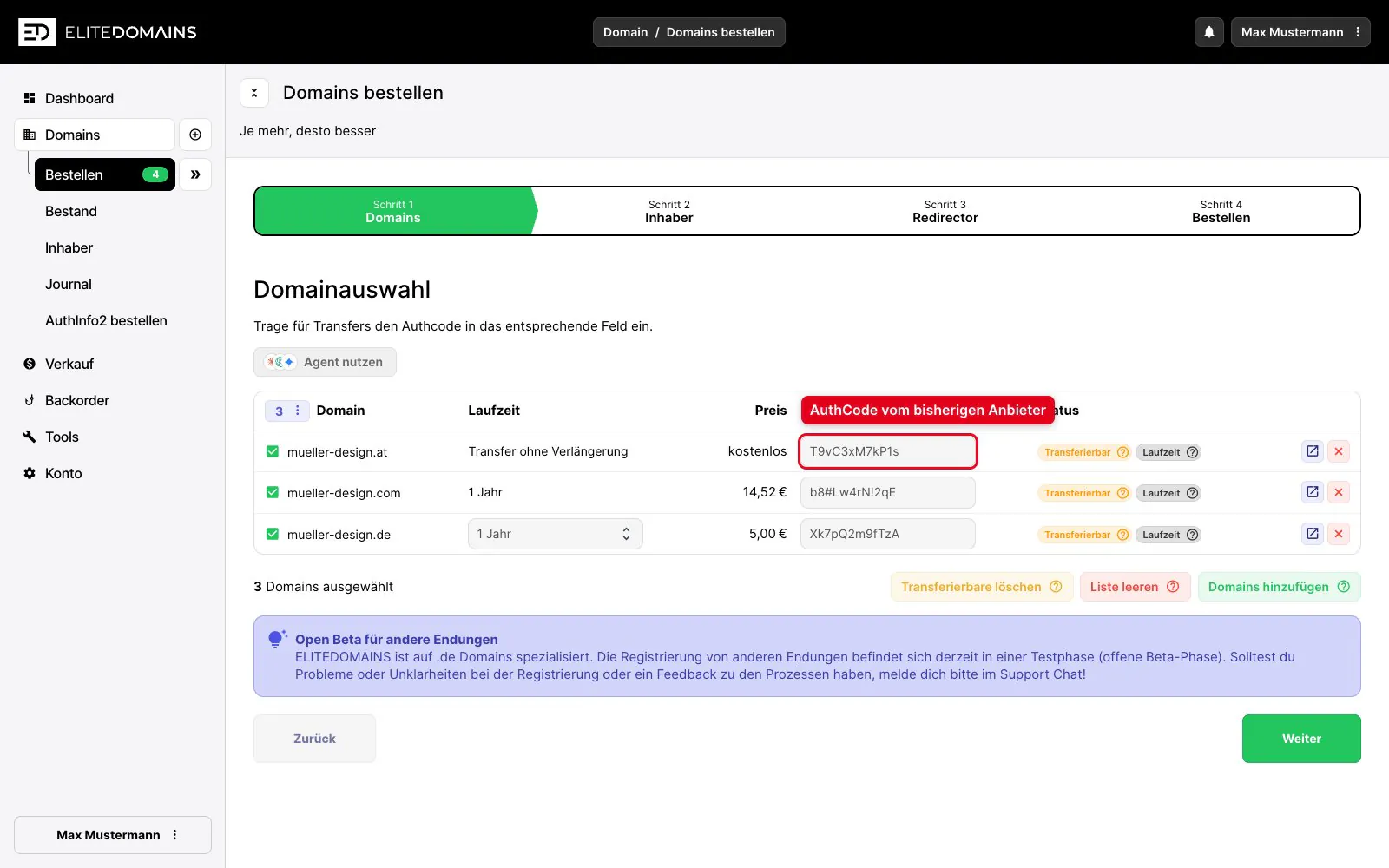
If you move to ELITEDOMAINS, you enter the code in the order, individually for each domain or for many domains at once:
#5) How long is an AuthCode valid?
For .de domains, an AuthCode is valid for exactly 30 days from when it was created. After that you create a new one. For other extensions the registry sets the period; if a code has expired, simply request a new one.
#6) What do I do if the AuthCode doesn't work?
- Expired: Request a new code from your current provider.
- Copied incorrectly: Copy only the code itself, without spaces before or after it. You remove invisible special characters by first pasting the code into a plain text file.
- Error at the provider: If the provider created a wrong code, request a new one.
- Provider doesn't respond: For .de domains, you order an AuthInfo2 code via the new provider, i.e. from us. A request directly to DENIC is not enough. The code comes by letter and replaces the AuthCode.
- How can I delete domains or let them expire?
- Which domain contacts (handles) do domains have?
- What is the HOLD status for domains?
- Domain life cycle: when deleted domains become free
- How do I manage domains with tags, filters and notes?
- What are premium domains and why are they more expensive?
- Moving a domain: AuthCode at IONOS, Strato & co.
- How can I register domains?
- How can I rescue a .de domain?
- What is a RESTORE order for deleted domains?
- What is the Redemption Grace Period (RGP) for .de domains?
- What is the difference between ccTLD, gTLD and newTLD?
- Moving and transferring a domain: transfer guide
- Why do I have to confirm a domain transfer?
- How does the transfer service for domains work?
Last updated on 28/11/2026 at 21:07
Let's go!
Create your account now
Register your next domain with us and compare us with your current provider. The account is free.
Join for free now
