#What does the domain Redirector do?
 FAQ: This is the help centre of ELITEDOMAINS. We are a domain provider that lets you manage domains simply and smartly. We also run a domain catcher, a domain marketplace and attractive landing pages to sell domains automatically.
Contents
The ELITEDOMAINS Redirector sets where a domain sends its visitors. There are four methods for this: Standard for a landing page, white screen, backorder page or sale page; DNS for your own entries on our name servers; external name servers for third-party services; and URL forwarding to existing projects. For .de domains we automatically switch to DENIC's fast name servers where it fits.
#1) Which methods does the Redirector have?
In the Redirector you choose a method for each domain, as a separate tab in the dialog „Redirector bearbeiten“ (edit Redirector):
| Method | What for | More |
|---|---|---|
| Standard | ready-made ELITEDOMAINS pages, without settings of your own | section 2 |
| DNS | your own DNS entries on our name servers | DNS entries |
| „Externe Nameserver“ (external name servers) | name servers of another provider, e.g. for hosting or parking | External name servers |
| „URL-Weiterleitung“ (URL forwarding) | forwarding to an existing project | section 5 |
#2) What does the Standard method show?
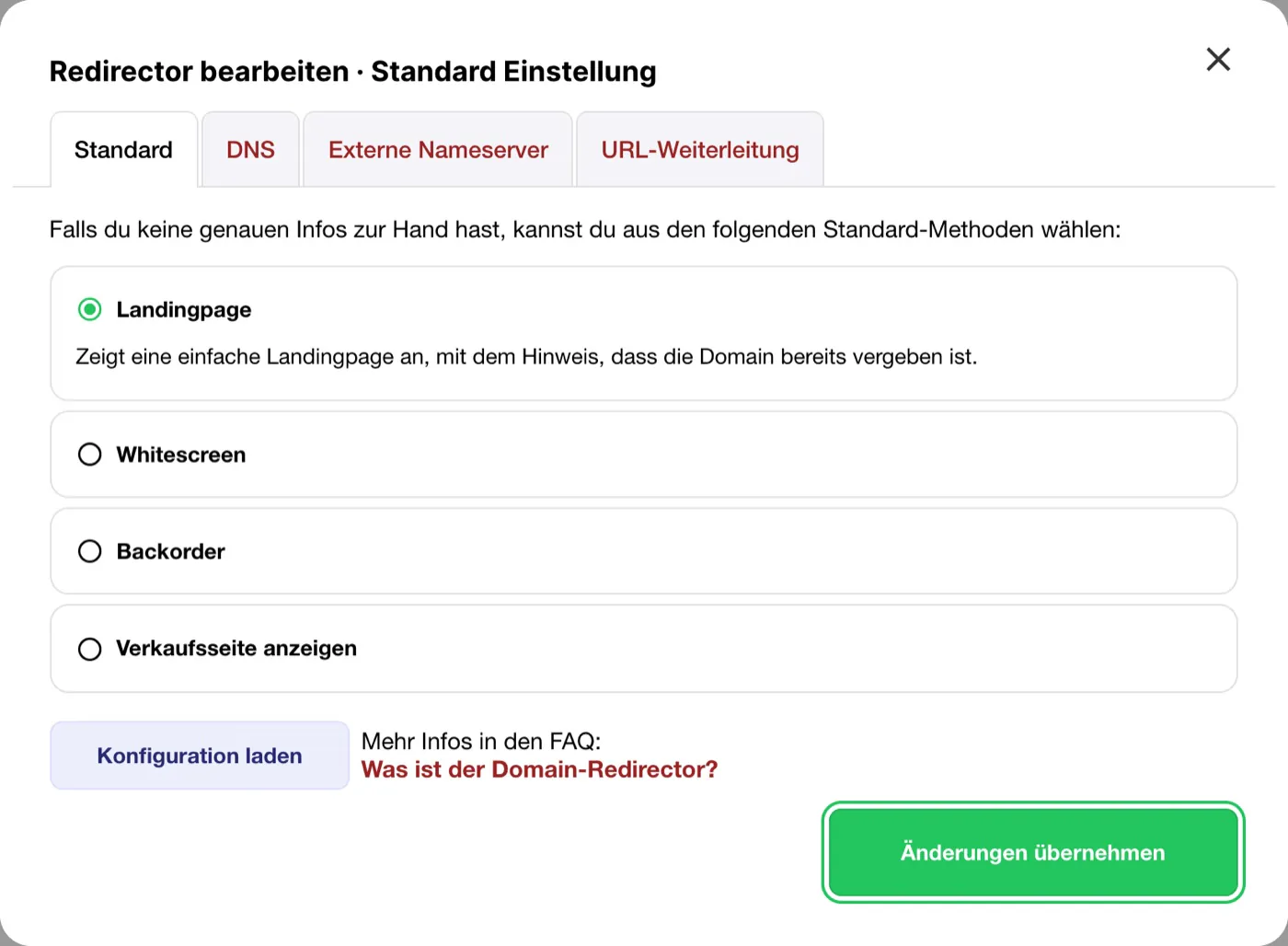
With Standard you register a domain without further settings and choose something else later. There are four options:
- Landing page: a simple page saying that the domain is already taken.
- White screen: an empty white page without content, for example in case of legal problems, until the case is resolved.
- Backorder: our backorder landing page, to which we point domains straight after a successful catch.
- Show sale page: The domain shows its sale page. For new domains we create one automatically, provided you have set a default sale page in the settings.
Sale page and routing of the domain are separate. This way you can promote a sale page via a deep link, for example, while the domain points to an external parking page.
#3) What can I set with the DNS method?
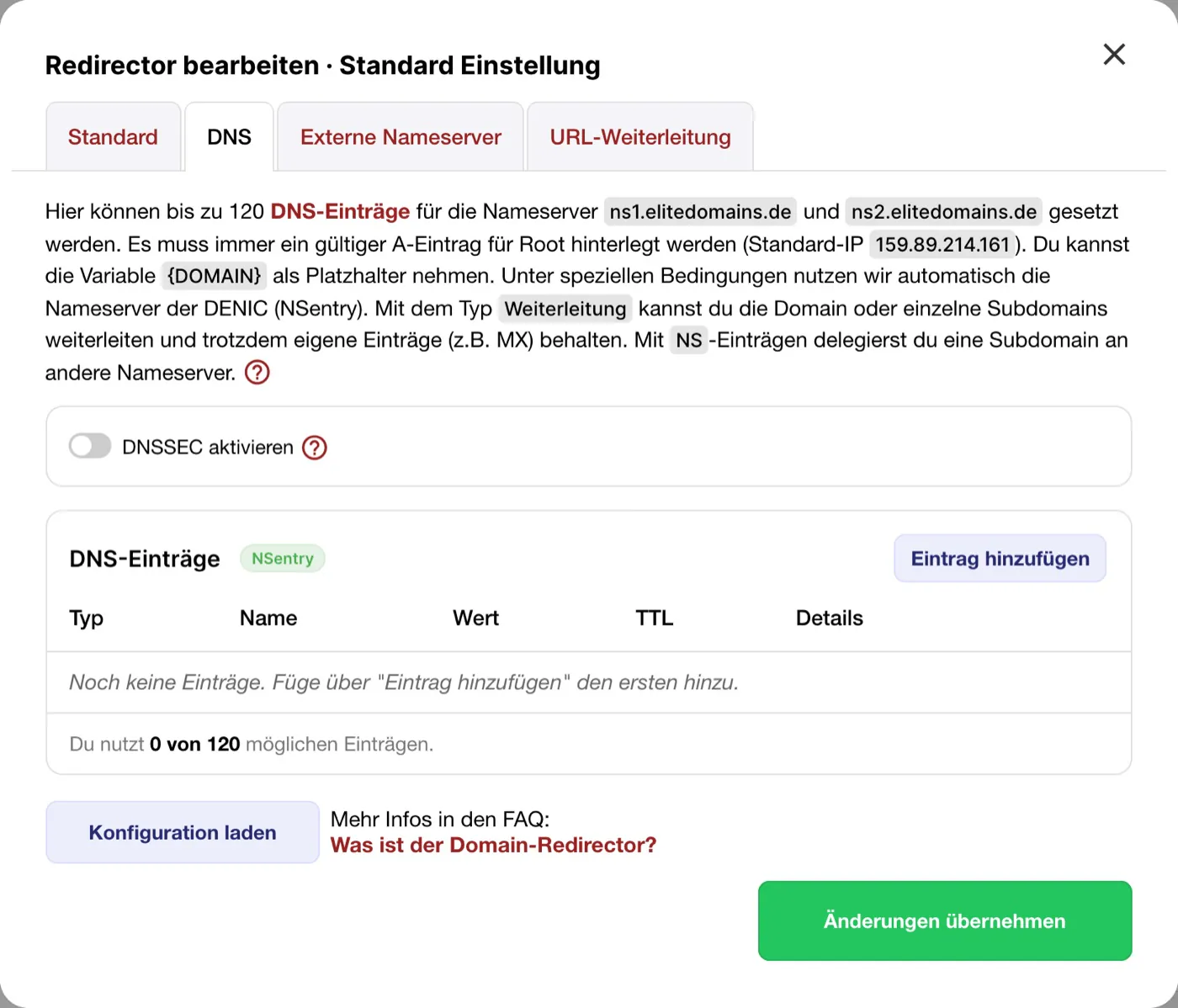
With DNS, your entries run via our name servers ns1.elitedomains.de and ns2.elitedomains.de. You create up to 120 entries of the types A, AAAA, CNAME, MX, NS and TXT, plus a forwarding for the domain or individual subdomains. How each type works is explained under DNS entries.
#4) When do I need external name servers?
With external name servers, another provider takes over the domain's DNS, for example your web host or a parking service. You enter between 2 and 13 name servers. The domain must be set up there beforehand, otherwise DENIC rejects the change with the status FAILED; you can check this with DENIC's predelegation check.
For well-known parking providers such as Sedo or ParkingCrew there are ready-made templates. You activate DNSSEC for external name servers with the provider's key. With every change of name servers, keep to the order and waiting times under changing name servers, even if no website and no email run on the domain. Otherwise all services of a signed domain fail until the old DS entry has disappeared from the caches.
#5) How do I forward a domain by URL?
With URL forwarding you send the domain to an existing project. You enter the target URL and choose the type of forwarding:
- 301 (permanent): for permanent moves, recommended by Google and the best choice for search engine optimisation.
- 302 (temporary): The old domain stays in the Google index.
- Meta refresh: forwarding via an HTML tag; the referrer is passed on to the target.
- Frame forwarding: The domain stays visible in the browser's address bar.
- JavaScript: The visitors' referrer is cleared.
#6) When are DENIC's name servers (NSentry) used?
A separate method for DENIC's name servers no longer exists since 2025; we use them automatically for .de domains: always with Standard and URL forwarding, with DNS only if your entries meet the conditions for NSentry. These are at most 5 entries, only A, AAAA and MX, no wildcard and no virtual name servers. With NSentry the domain answers directly from the .de zone, fast and signed with DNSSEC.
#7) How do I use the domain as a variable?
With DNS and URL forwarding you can enter the variable {DOMAIN} instead of the domain. This way you set settings by bulk for many domains at once, and each gets its own value:
Example for DNS
Entry: @ IN MX 10 mail.{DOMAIN}
Result: Every domain in the selection gets an MX entry pointing to mail.<domain>.
Requirement: mail.<domain> resolves and is a configured mail server.

Example for URL forwarding
Entry: sedo.com/search/details.php4?domain={DOMAIN}
Result: Every domain in the selection forwards to its own URL with the domain at the end.
#8) How long does an update of the settings take?
If you change the method, DENIC's servers are usually updated after 5 minutes. If your internet provider keeps the old answer in its cache, it can take up to 24 hours. Changes within a method take effect immediately. If you still see the old state, clear the browser cache or open the domain in a private window or on another device.
- How do I configure DNS entries in the name server?
- How do I activate DNSSEC for my domain?
- What is DNSSEC and how does it work?
- Enter external name servers, e.g. for Sedo Parking
- What are glue records in DNS and when do I need them?
- How do I set up an MX record for my domain?
- What is a subdomain and how do I create one?
- How do I use virtual name servers?
Last updated on 28/11/2026 at 21:13
Let's go!
Create your account now
Register your next domain with us and compare us with your current provider. The account is free.
Join for free now
